
Buying or partitioning land without verifying the exact boundaries is like buying a house without checking who owns the front door. You might think you own it all, but on paper, a missing or incorrect boundary map can stall your property deal or trigger years of legal battles.
If you are dealing with agricultural land or property division in Karnataka, the 11E Sketch is your single most important legal map.
In this guide, you will learn how to view your 11E sketch online, understand land alignment, download Fodi sketches on the Mojini portal, check application status, and avoid the common mistakes that cost landowners months of delay.
What is an 11E Sketch?
An 11E Sketch is an official survey document issued by the Survey, Settlement, and Land Records (SSLR) department of Karnataka. It shows the exact physical location, boundaries, dimensions, and shape of a specific parcel of land within a larger survey number.
11E Sketch vs Fodi Sketch
Many landowners mix up an 11E Sketch, a Fodi Process, and a Pre-Mutation Sketch. While they are related parts of the Mojini revenue platform, their uses differ:
| Feature | 11E Sketch | Fodi Sketch |
| Primary Purpose | Maps out a specific portion of land during sale/partition. | Combines or splits land records across multiple owners/surveys. |
| Initiated By | Individual land buyer, seller, or owner. | Revenue Department or joint landholders. |
| Portal Used | Mojini V3 / SSLR Portal | Mojini / Bhoomi Portal |
| Key Output | Detailed map with boundary dimensions for sale deed. | Updated sub-division survey numbers (Hissa Map). |
Step-by-Step Process to View 11E Sketch on Mojini
The Karnataka Revenue Department has simplified the sketch viewing process through the Mojini v3 portal. Follow these steps:
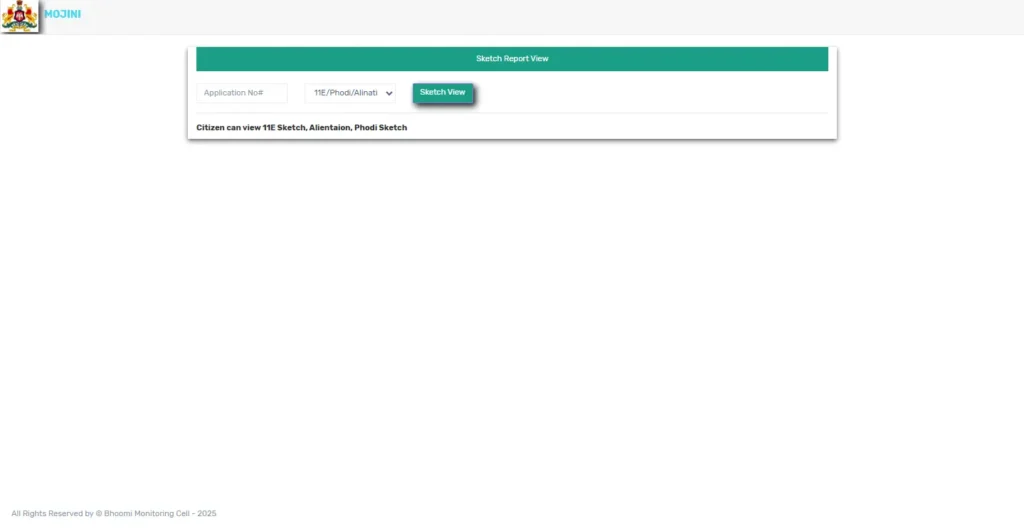
Step 1: Access the Portal
- Open any web browser on your computer or smartphone
- Visit the official website: bhoomojini.karnataka.gov.in
- Wait for the homepage to load completely
Step 2: Locate the View Sketch Option
- Scroll down the homepage
- Look for the “View Sketch” option in the menu
- Click on this option to proceed
Step 3: Enter Application Details
- A new page titled “Sketch Report View” will open
- Enter your Application Number in the designated field
- This number is provided when you submit any land-related application
- Double-check the number for accuracy
Step 4: Access Your Sketches
- Click on the “Sketch View” button
- The system will display available sketches linked to your application
- You can view all three sketches: 11E Sketch, Alignment, and Fodi
- Download options are available for future reference
Alternative Method Using Mobile App
Mojini also offers a mobile application for Android users. After installing the app from Google Play Store:
- Mojini v3 Login using your credentials
- Navigate to the “Land Sketches” section
- Enter the reference number manually, or select from previous applications
- The land record sketch will display on your screen
- Save or share the document as needed
How to Check Your 11E Sketch Application Status
Already applied and just want to know where things stand? Here’s your move:
- Visit the Mojini V3 Application Status page
- Enter your application number, or search by mobile number or survey number
- Click “Get Status”
- You’ll see the current stage — “Pending Verification,” “Under Survey,” or “Ready for Print”
Pro tip: bookmark this page if you’re mid-application. Status typically updates within a few working days of any change at the department’s end.
How to Download Your 11E Sketch as a PDF
Once your sketch is generated, downloading it is straightforward:
- Open the View Sketch section and pull up your sketch as shown above
- Look for the download/print icon next to the sketch preview
- Save it as a PDF for your records
- Keep both a digital and printed copy — you’ll need it again at the registrar’s office
Always download and store this immediately. Portals get updated, links change, and you don’t want to be searching for it again the day of your registration appointment.
How to Apply for a New 11E Sketch
If a sketch doesn’t exist yet for your land, you’ll need to apply fresh:
- Log in to the Mojini portal (registration required for new applications)
- Select “Apply for Survey/Sketch”
- Fill in your land and owner details accurately
- Pay the applicable fee online (viewing existing sketches is free; new applications carry a nominal charge)
- Submit and note down your application number for tracking
A field survey typically follows before your sketch is finalized, so build in a buffer of a few weeks when you’re planning a registration timeline.
Application Fees & Processing Timelines
| Service Type | Standard Fee | Tatkal / Express Fee | Estimated Processing Time |
| Standard 11E Sketch | ₹350 – ₹500 | N/A | 15 to 30 Working Days |
| Tatkal 11E Survey | ₹1,500 – ₹2,000 | Applicable | 7 to 10 Working Days |
| Fodi Sketch Processing | ₹200 – ₹400 | N/A | 30 to 45 Working Days |
Note: Fees are subject to official updates on the Karnataka SSLR revenue portal.
FAQs: Frequently Asked Questions
An 11E Sketch is a legally binding survey document issued in Karnataka that defines the exact physical boundaries, area, and location of a sub-divided portion of land within a main survey number.
Check the rejection reason in your Mojini status panel. Common issues include document mismatches or boundary disputes. Correct the flagged discrepancies or re-upload clear documents, then resubmit your application.
The 11E Sketch is primarily used for agricultural land registration. Non-agricultural conversions may require additional documents alongside it.
Yes. Viewing and downloading existing sketches is free. A nominal fee applies only when you apply for a new survey or sketch.