
Bhoomi RTC Karnataka: Buying agricultural land or applying for a farm loan in Karnataka? A single error in your property records can stall your bank approval or expose you to land fraud. Fortunately, state digitization under the Bhu Suraksha project means you no longer need to chase village accountants for paper documents.
This guide cuts through government portal jargon and gives you a step-by-step roadmap to check, view, and download your Bhoomi RTC online report in minutes. Learn how to navigate the portal seamlessly, avoid frequent session timeouts, and secure a legally binding document.
Bhoomi RTC Karnataka: Quick Highlights
| Article Name | Bhoomi RTC 2026 Guide |
| Full form | Record of Rights, Tenancy and Crops (also called Pahani) |
| Official portal | landrecords.karnataka.gov.in |
| Certified copy (i-RTC) fee | ₹10 per extract, requires Bhoomi i-Wallet login + eKYC |
| Mutation extract fee | ₹15 per extract |
| Mutation status check fee | ₹15 per query |
| Manual mutation timeline | 30–45 days after a private sale |
What is a Bhoomi RTC (Pahani) and Why Do You Need It?
Bhoomi RTC stands for Record of Rights, Tenancy and Crops. People also call it Bhoomi RTC Pahani, and it is the single source of truth for your agricultural land in Karnataka.
It contains your Katedar (owner) name, survey number, Hissa number, land type (dry/wet/garden), and active loans in Column 11. If there is a bank lien, court stay, or old tenant entry, it will show up here and banks will stop your loan instantly.
How to View Your Bhoomi RTC Online for Free
If you need to quickly check ownership details or inspect encumbrances during site visits, use the free Bhoomi RTC view tool. It requires no registration or login credentials.
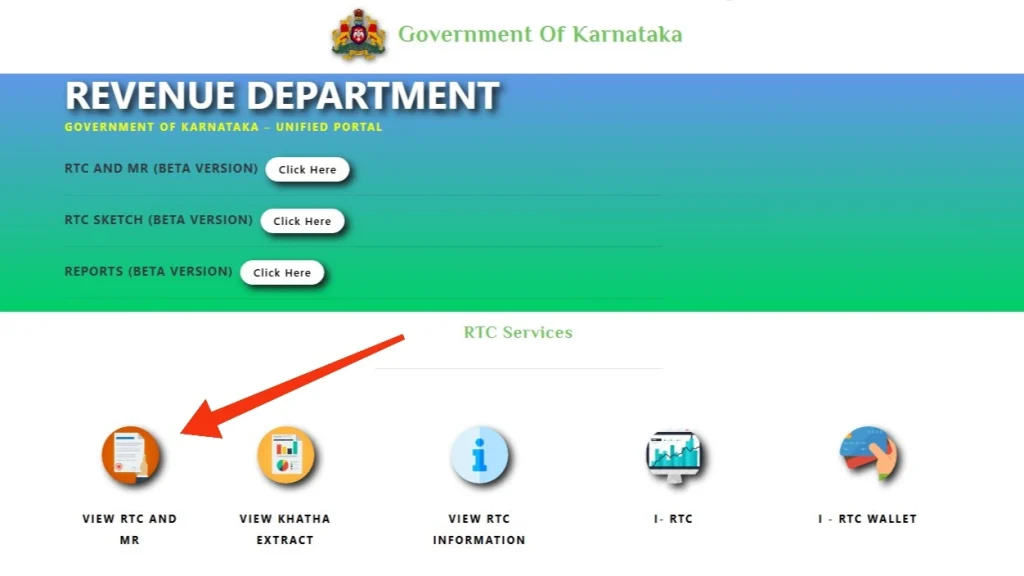
Follow these simple steps:
- Visit the official Karnataka land records portal (
landrecords.karnataka.gov.in). - Click on View RTC and MR under the main services menu.
- Select your District, Taluk, Hobli, and Village from the cascading drop-down menus.
- Select your Survey Number, Surnoc, and Hissa details.
- Choose the Current Year or historical records, then click Fetch Details.
- Click View to load your RTC Bhoomi online record on screen.
Note: The free web view is ideal for fast verification, but it lacks a digital signature and cannot be submitted to banks for loan processing.
Bhoomi RTC vs. Khata – Don’t Get Confused
Think of it like this. Bhoomi RTC is like your farm’s Aadhaar card issued by the Revenue Department. It says who owns the farmland and what is grown on it.
A Khata / E-Swathu is like your apartment’s electricity bill issued by the panchayat or BBMP. It says who pays tax for a converted, non-agricultural plot.
| Feature | Bhoomi RTC Pahani | Khata / E-Swathu Form 9 |
|---|---|---|
| Applies To | Agricultural / rural revenue land | Converted, residential / urban plots |
| Issued By | Tahsildar, Revenue Department | Gram Panchayat / BBMP |
| Used For | Crop loan, sale of farmland, PM-Kisan | Building approval, property tax, BBMP sale |
| Portal | Bhoomi (landrecords.karnataka.gov.in) | E-Swathu / E-Aasthi portal |
If your land got DC conversion, it must exit the Bhoomi system and enter the E-Swathu system. Ask for Form 9 if the seller says it’s converted.
How to Download a Certified i-RTC via Bhoomi i-Wallet
Most people get stuck because they download the wrong version. The free view is for your own checking, the paid i-RTC is what the bank and court will accept.
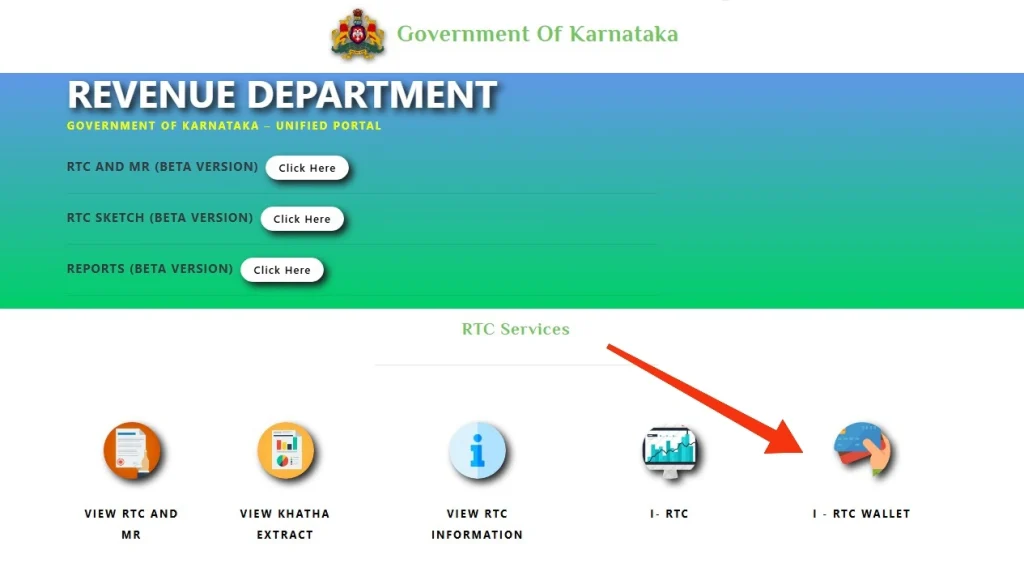
Here is how to complete your RTC online login and download certified copies:
- Go to landrecords.karnataka.gov.in and click i-Wallet Login / Citizen Login.
- Click Create Account. Enter your mobile number, Aadhaar, and email. Verify with OTP. The OTP expires in 30 seconds, so enter it quickly.
- Once logged in, click Top-up i-Wallet and add at least ₹20 using UPI or Net Banking.
- Now click I Bhoomi RTC, enter your village and survey details just like free view.
- Click Pay ₹10 & Download RTC. The PDF will be saved. Keep this native PDF. Don’t print and scan it again, or the digital signature will break.
If a network glitch deducts funds without downloading the file, do not panic. Open the menu, select Download Missed Documents, enter your transaction reference number, and retrieve your PDF without double-paying.
You must understand this difference before you pay:
| Parameter | Free Bhoomi RTC View | Certified i-RTC (i-Wallet) |
| Cost | ₹0 (Free) | ₹10 per document |
| Portal Login | Not Required | Requires Bhoomi RTC online login |
| Signature & QR Code | No | Yes (Cryptographically Digitally Signed) |
| Legal / Bank Validity | Informational Only | Legally Valid for Banks, Mortgages, & Courts |
| Downloadable PDF | Web View / Browser Print | High-Resolution Official PDF Extract |
How to Search Bhoomi RTC by Owner Name
Lost your survey number? You can run a search for Bhoomi RTC by name to locate land parcels registered in your village.
- Access the Bhoomi online search page and select Search by Owner Name.
- Choose your District, Taluk, Hobli, and Village.
- Type the owner’s name in Kannada or English.
- Click Search to display all matching survey numbers in that village.
Pro Tip: Transliteration errors between English and Kannada spellings often block results. If searching for Bhoomi RTC by owner name yields no matches, verify the exact spelling on older sale deeds or pull an Encumbrance Certificate (EC) via Kaveri 2.0 to locate your precise survey number.
Bhoomi RTC Login Forgot Password & OTP Issues
Forgotten credentials or gateway errors shouldn’t halt your land verification. Follow these simple steps if you get locked out during RTC online login:
- Click Bhoomi RTC login Forgot Password on the account portal.
- Enter your registered mobile number or User ID and solve the CAPTCHA.
- Wait for the 6-digit OTP sent to your phone.
How to Check Mutation Status (MR) on Bhoomi
Buying land without checking mutation status leaves your ownership incomplete. Registration at the Sub-Registrar’s Office creates a sale deed, but a Mutation Register (MR) entry transfers the owner’s name on government land records.
- Select Mutation Status on the Bhoomi online dashboard.
- Input your District, Taluk, Hobli, Village, and Survey Number.
- Click Fetch Details to review your MR application stage.
If your mutation status shows “Approved,” your name updates automatically on the main Bhoomi RTC online report. If it remains stuck past the standard 30-to-45-day window, submit a fast RTI application to the Tahsildar to clear administrative delays.
Frequently Asked Questions
A standard view of your RTC report on the Bhoomi portal is completely free for informational purposes. Downloading a digitally signed, legally valid i-RTC extract costs ₹10 per copy using the i-Wallet service.
Yes, digitally signed i-RTC extracts downloaded via the Bhoomi i-Wallet contain verification QR codes and are legally valid for bank mortgages and legal proceedings. Free browser prints, however, are for viewing purposes only and are not accepted by financial institutions.
Minor spelling corrections require submitting an application along with supporting ID proofs to your jurisdictional Tahsildar or local Nadakacheri center. Once revenue officers verify original physical ledgers, your name will update in the digital system.
This error usually occurs if the survey sub-division (Hissa) is entered incorrectly or if post-partition spatial mapping (Podi) is pending with the survey department. Cross-check your survey number using Kaveri 2.0 EC or verify maps on the Mojini V3 portal.
Manual land mutation typically takes 30 to 45 days after the Sub-Registrar transmits the digital J-slip to the revenue office. Automated mutations for bank releases or standard conversion updates process significantly faster.